As an SEO specialist, I often work with dozens of niche sites and expired (drop) domains. When rebuilding or redirecting drops, having an SSL certificate is not just an option — it’s a necessity. If a high-authority domain previously used https, you must maintain that secure connection; otherwise, you'll lose the link equity from all existing backilnks pointing to secure URLs.
To make these "satellite" networks profitable, you need a hosting provider that allows an unlimited number of domains, and Namecheap is one of the best choices for this purpose. However, it has one significant drawback for power users: while they offer a free PositiveSSL for the first year, they charge about $11 for every renewal starting from the second year. When you're managing 50 or 100 domains, these costs can quickly destroy your ROI.
While Namecheap pushes their proprietary paid solutions for convenience, expert users can utilize the Terminal to save costs without sacrificing security. I’ve chosen acme.sh for this task because it’s the most lightweight and reliable tool available — it doesn’t require “root” access and is perfectly suited for shared hosting environments.
Icon for access to the Terminal is placed in the Advanced pane in cPanel
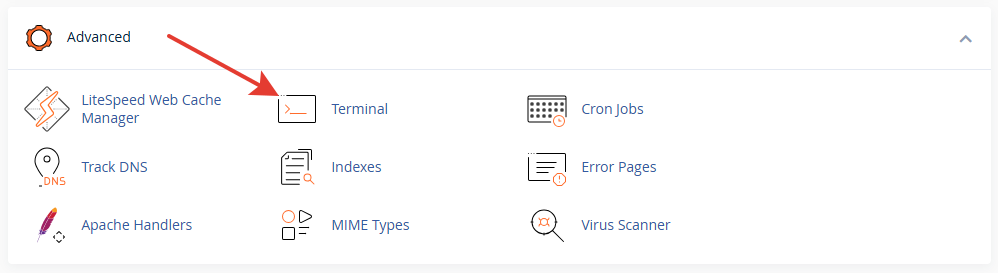
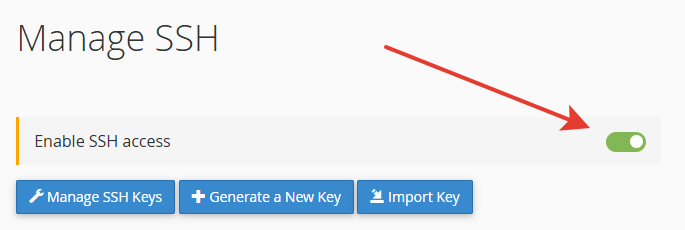
If you can't find it there, enable SSH in the Manage Shell pane
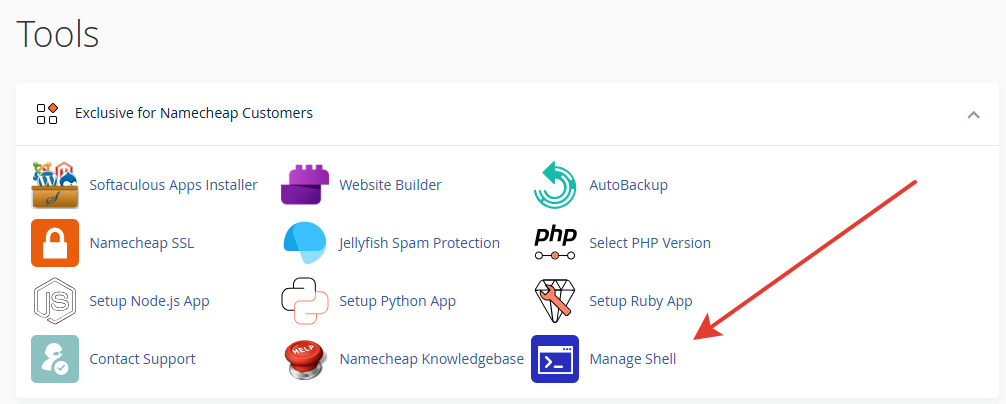
Log into your cPanel Terminal and install the utility:
curl https://get.acme.sh | sh -s email=your-email@gmail.com
Crucial: Restart your terminal session or run source ~/.bashrc to initialize the script path.
source ~/.bashrc
By default, the script might point to ZeroSSL. For a smoother experience without manual API keys, I recommend switching to Let's Encrypt:
acme.sh --set-default-ca --server letsencrypt
acme.sh --register-account -m your-email@gmail.com --server letsencrypt
The biggest pitfall here is the Document Root. If your domain is an "Addon Domain," it's likely located in a specific folder, not the default public_html.
Check your cPanel "Domains" section for the exact path. Run the issuance command:
acme.sh --issue -d your-site.com -d www.your-site.com -w /home/username/path_to_your_site
Issuing the cert isn't enough; you need the server to use it. Use the cpanel_uapi hook to automate the installation:
acme.sh --deploy --deploy-hook cpanel_uapi --domain your-site.com --ecc
Note: I use the --ecc flag. Elliptic Curve Cryptography is more modern, faster, and provides better security than the older RSA standard.
Once successful, acme.sh adds a cron job to your server. It will automatically renew your certificates 30 days before they expire.
Pro-tip: Use acme.sh --list to monitor your certificates' health. If you see "LetsEncrypt.org" in the CA column, you're good to go.
acme.sh --list

 Upwork statistics
With 10+ years of experience and an engineering mindset, I don’t just optimize content—I optimize the entire technical environment. Whether it's implementing automated SSL solutions to cut overhead costs or mastering emerging AI-driven ecosystems like GEO and AEO, I ensure your business stays visible and secure.
My approach is built on transparency: from deep-dive technical workarounds (like the one in this post) to market-leading search strategies. My long-standing Upwork history and proven results are a testament to my reliability. Let’s connect and turn your technical challenges into a competitive search presence.

Can I get a free SSL certificate on Namecheap shared hosting?

Yes, even though Namecheap promotes paid PositiveSSL certificates, you can install a free Let's Encrypt SSL using the Terminal (SSH) and the acme.sh script. This method allows you to bypass manual installation and automate the renewal process for all your addon domains.
Do I need root access to install free SSL via Terminal?
No, you do not need root or sudo privileges. The acme.sh script is designed to work within the user's home directory, making it the perfect solution for shared hosting environments where you only have standard SSH/Terminal access.
Is Let's Encrypt SSL as secure as Namecheap’s PositiveSSL?
Technically, yes. Both provide the same level of industry-standard encryption (AES-256). The main difference is that PositiveSSL is a commercial product with a warranty, while Let's Encrypt is a free, open-source alternative. For most SEO projects, blogs, and niche sites, Let's Encrypt is more than sufficient.
Why should I use SSL for expired (drop) domains?
If an expired domain previously used https, you must have an active SSL certificate to capture the link equity. Without SSL, browsers will block the connection, and search engines won't be able to follow the redirects from your old high-authority backlinks, effectively wasting the domain's SEO value.
Does acme.sh renew certificates automatically on cPanel?
Yes. During the first installation, acme.sh automatically creates a cron job (a scheduled task) on your server. This task runs daily and will automatically renew any certificate that is within 30 days of expiration, ensuring your sites never show a "Not Secure" warning.

Submit a Request
If you would like to receive any additional information or ask a question, please use this contact form. I will try to respond to you as soon as possible.
Order a Service